Fontys ICT & Embedded Systems · Open Day

Turn one byte
into light

Everything you need to show the PCF8574 Linux driver at the Open Day: a stand idea visitors can play with, a talk plan for people who have never seen code, and the user-space library and demo app that make the LEDs respond.

Driver: Georgi Markov · mrk3312/device-driver-pcf8574 Library + demo app: C, no dependencies
O
0100 1111
Every letter is a number. 8 LEDs show it in binary.
1 · The stand idea

“Light up your name”

Visitors don't need to understand a kernel to be impressed by one. Give them something to do in the first ten seconds, then explain what just happened behind the lights.

1

Light up your name

A visitor types their name. Each letter appears on the 8 LEDs as its binary code: G is 71, which is 0100 0111. Everyone gets the point instantly: computers store letters as numbers.

Demo app: t · Simulator: “Type your name”
2

Beat the binary quiz

The LEDs show a random number. The visitor adds up the values printed under the lit LEDs (128, 64 … 1) and types the answer. Keep a high-score sheet on the table — teenagers will compete.

Demo app: q · Simulator: “Quiz”
3

Look inside

For the curious: the screen decodes every byte the app sends to your driver, colour-coded like the diagram in your README. This is where you talk about drivers, the kernel and I2C.

Always visible on the demo screen
Top view of the stand: poster at the back, hardware on the left, screen and keyboard in the middle, tablet and printouts on the right, visitors at the front Poster: how a keypress becomes light TABLE Pi 8574 8 LEDs + value strip pcf_demo ○ ● ○ ○ ○ ● ● ● 'G' 0 0 1 1 1 1 1 0 setPin(6, ON) Keyboard: visitors type simulator + QR code A=0100 0001 High scores Tablet + printouts Visitors in front: they touch, type and play You

Stand beside the table, not behind the screen, so visitors walk up to the keyboard instead of to you.

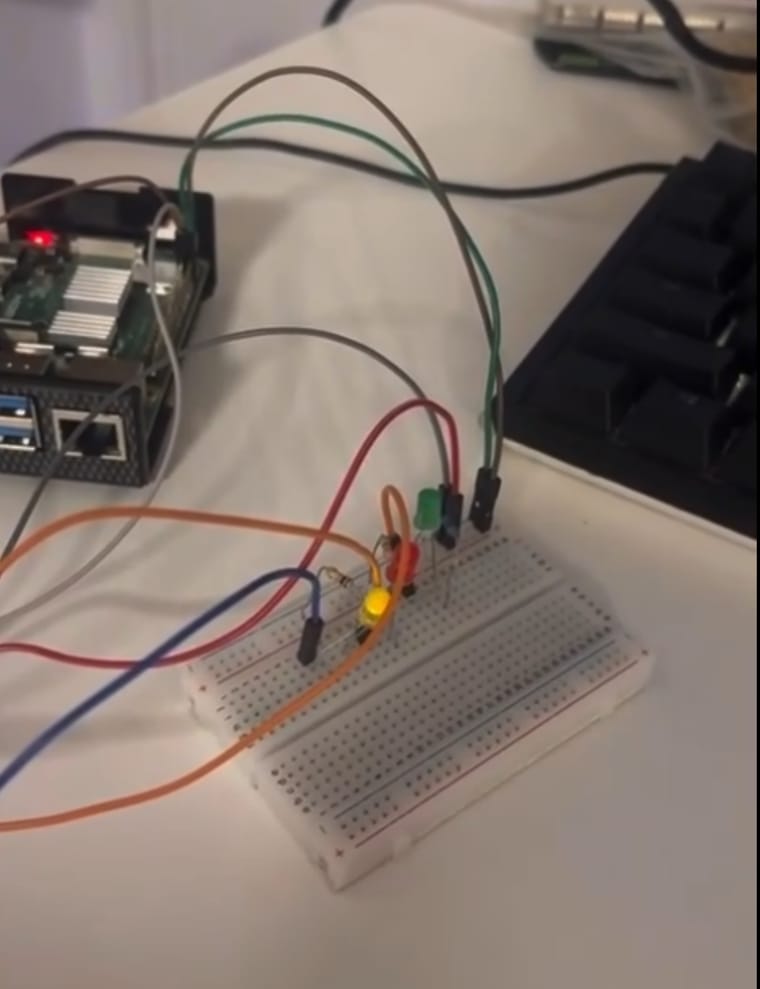
Raspberry Pi wired to a breadboard with three LEDs
Where it stands today. The prototype drives 3 LEDs on pins 5–7. For the Open Day, wire all 8 LEDs in one straight row, pin 7 on the left, with the values 128 … 1 printed underneath.

Hardware on the table

  • Raspberry Pi with the driver built and tested
  • PCF8574 module, powered from 3.3 V
  • 8 LEDs of the same colour + 8 resistors (330 Ω–1 kΩ)
  • Monitor + keyboard, terminal font zoomed in
  • Spare SD card with a working copy of the setup

Printed on paper

  • Value strip under the LEDs: 128 · 64 · 32 · 16 · 8 · 4 · 2 · 1
  • Binary alphabet card (print it from Setup)
  • Quiz high-score sheet and a pen
  • QR code to this page (also in Setup)
  • Poster with the 7-step journey from the simulator below
2 · Try it

The driver, simulated in your browser

Same protocol and same rules as the real driver and library. Click an LED, type a letter or start the quiz. Use it to rehearse, or put it on a tablet at the stand.

PCF8574 · 8 pins 0
All LEDs are off. Click one.

What the app just sent

—
76543210
      User space
      Your apppcf_demo
      libpcf8574builds the byte
      Linux kernel
      /dev/pcf8574system call
      pcf8574 driverremembers all 8 pins
      Hardware
      I2C bus2 wires
      PCF85748 pins
      LEDslight up

      Notice what travels over the I2C bus: not your command, but the driver's full 8-pin picture. The chip can only take all 8 pins at once — that's why the driver keeps them in memory.

      3 · How to explain it

      Talking to people who have never written code

      Your visitors are 16–18 year olds choosing a study, and their parents. Most have never heard of a kernel, and they don't need to. They should walk away thinking: “I understand what he built — and I could learn that.”

      Let them do it first

      Hand over the keyboard before you say a single technical word.

      Start at the lights

      Begin with what they see. Go one layer deeper only when they ask.

      Picture first, word second

      Use an analogy below; say the real term only after the picture lands.

      Link it to their world

      Phones, cars, game consoles, washing machines: all of them are software talking to chips.

      Make it personal

      Tell them what you didn't know when you started. That's the sentence parents remember.

      The whole project in six pictures

      Use them in this order. Each one adds a layer: you can stop after any of them and the story still makes sense.

      Raspberry Pi + Linux

      A tiny computer

      The Pi is a full computer the size of a credit card. It runs Linux, the same core that is inside every Android phone.

      PCF8574 · I2C

      A power strip for switches

      The Pi has only so many pins. This chip plugs into just 2 wires and gives back 8 switches. Several chips can share the same 2 wires, each with its own number.

      Kernel · driver

      A translator at the security desk

      Apps aren't allowed to touch hardware: the kernel guards it like a security desk. My driver is the translator at that desk who speaks this chip's language.

      1-byte protocol

      A postcard with 8 boxes

      Every request is one byte: 8 yes/no boxes. Three say which light, one says on or off, two say what kind of request. That's all it takes.

      Driver memory

      A notebook of all 8 lights

      The chip only accepts the full picture: all 8 lights at once. So the driver keeps a notebook, changes the one line you asked for and sends the whole page.

      Why it matters

      Every gadget works like this

      A phone camera, a car sensor, a smart thermostat: each chip needs someone to write the software that talks to it. That someone can be them.

      Talk tracks

      Three lengths of the same story. Read the visitor: start with 30 seconds and extend only when they lean in or ask a question.

      For passers-by and parents. The whole thing happens while they type.

      Hook0:00
      Type your name here.Point at the keyboard. Demo app in letter mode (t).
      Reveal0:10
      See the lights? Every letter in a computer is really a number, and these 8 lights show that number in binary.
      The work0:20
      The part you can't see is mine: I wrote the piece of Linux that lets this program talk to that little chip. That's called a driver — and building things like this is what ICT & Embedded Systems is about.

      Adapt to who's in front of you

      Kids 10–14

      Lights and binary only. Play the quiz, cheer when they get it right. “Computers count with only 0 and 1 — and you just did too.”

      Future students 16–18

      The 2-minute story, then: “You don't need to know any of this yet. This is what you learn here.” Show a few lines of the code on screen.

      Parents focus: future

      What the skills lead to: embedded software for cars, medical devices, robots, smart homes. And that the study is hands-on: real hardware, not only theory.

      Techies go deep

      Character device and file_operations, i2c_client, Device Tree matching, why the driver keeps a copy of the pin state, and the ioctl commands.

      Jargon, translated

      If one of these words slips out, follow it straight away with the plain version.

      TermSay instead
      kernelthe core of the operating system: the boss of all the hardware
      drivera translator between programs and one specific chip
      I2Ca two-wire “phone line” many chips share, each with its own number
      GPIO pina pin the computer can switch on or off
      bit / byteone yes/no box / a row of 8 of them
      user spacewhere normal apps live, with no direct access to hardware
      system callthe official way an app asks the kernel for something
      /dev/pcf8574the mailbox where apps drop messages for my driver
      Device Treethe Pi's list of what is connected to it
      ioctla “special request” form, for things like “all lights off”

      Questions you will get

      Short pointers, not scripts. The personal ones only work in your own words.

      “Did you already know programming before you started?”
      Answer honestly from your own experience — this is the question parents care about most. If you started as a beginner, say so: it's the most encouraging thing a 17-year-old can hear. For admission requirements, send them to the Fontys information stand rather than guessing.
      “What can you do with this later?”
      Anything where software meets hardware: cars, medical devices, robots, drones, smart-home products, consumer electronics, factory machines. Every chip in those needs software that talks to it, and someone who understands both sides.
      “Isn't there already software for this chip?”
      Yes: Linux has a general driver for this chip family (gpio-pcf857x). Building your own from scratch is the point: you learn every layer, from how the kernel finds hardware to how one byte travels from an app to a pin.
      “Why one byte?”
      It's the smallest message a computer sends in one go, and it fits everything: which pin, on or off, and what kind of request. The first version used 2 bytes with an 8-bit pin mask; the redesign halved it. The git history shows that change on 18 October 2025.
      “What happens if two programs use it at the same time?”
      Honest answer: the driver is a single-device prototype without locking, so two programs could interfere. Adding a mutex around the shared pin state is a natural next step — techies will appreciate that you know your own limits.
      “How long did it take? Was it hard?”
      Your own words. Facts you can lean on: the git history goes from registering the driver (16 October 2025) to the 1-byte protocol (18 October 2025), with the final version and documentation later.

      Closing lines that connect to the study

      Everything on this table — the electronics, the C code, the Linux part — is what ICT & Embedded Systems is about.
      If you like building things you can actually touch, ask me how I got started.

      Your personal line (fill this in)

      Parents remember one personal sentence more than any technical detail. Prepare yours before the day:

      Before this study I ______. Now I can ______.

      Then hand them the QR code or point them to the programme stand.

      4 · The library

      libpcf8574: setPin(6, ON) instead of bits

      Programs call plain functions. The library builds the command byte exactly as drawn in the README's “Communication mechanism” diagram and hands it to the driver. Nobody using it has to think about bits.

      The command byte

      Example: setPin(6, ON) → 0011 1110 = 0x3E

      bit 7bit 6bit 5bit 4bit 3bit 2bit 1bit 0
      Operation · bit 51 = WRITE0 = READ
      Byte update · bit 41 = STATE byte0 = DIRECTION byte
      Pin state · bit 31 = ON0 = OFF
      Pin number · bits 2–0000 = pin 0111 = pin 7
      FunctionRequestReaches the driver as
      setPin(pin, state)WRITE · STATEwrite(fd, &cmd, 1)
      setPinDirection(pin, dir)WRITE · DIRECTIONwrite(fd, &cmd, 1)
      readPin(pin)READ · STATEread(fd, buf, 2), bit pin of buf[0]
      readPinDirection(pin)READ · DIRECTIONread(fd, buf, 2), bit pin of buf[1]
      readAllPins(&s, &d)both bytesread(fd, buf, 2)
      setPort(value)one WRITE per changed pinwrite() × changed pins
      setAllPins(state)bulkioctl(fd, 2 or 1)
      initPins()bulkioctl(fd, 0)
      pcfOpen(path)NULL opens /dev/pcf8574; "sim" opens a built-in simulator for testing without hardware

      Two things to know about your driver

      1. Bit 5 isn't checked any more. The diagram puts the WRITE/READ flag on bit 5, but the final char_pcf8574_write() only looks at bits 4–0. The library sets bit 5 on every write, so it follows the diagram and works with today's driver. To make the driver enforce the diagram again, restore the check from commit 297aa95: if (!(byte & (1 << 5))) goto err;
      2. A READ byte must never be written. Today's write() would treat it as “set” and switch a pin. That's why the library answers READ requests with read(), which returns the driver's remembered state (not live input from the chip).
      Download all (.zip)
      #ifndef LIBPCF8574_H
      #define LIBPCF8574_H
      
      #include <stdint.h>
      
      /* USER-SPACE LIBRARY FOR THE PCF8574 CHARACTER DEVICE DRIVER */
      /* Userland programs call setPin(), readPin(), ... and never deal with the binary protocol themselves. */
      
      /* COMMUNICATION PROTOCOL (README.md -> "Communication mechanism") */
      /*
      *   Every request is described by 1 byte:
      *
      *   bit:    7   6   5    4      3      2   1   0
      *         [ 0 | 0 | OP | BYTE | STATE | PIN NUMBER ]
      *
      *   Bit 5       -> Operation request bit    (1 - WRITE; 0 - READ)
      *   Bit 4       -> Byte update bit          (1 - STATE byte; 0 - DIRECTION byte)
      *   Bit 3       -> Pin state bit            (1 - ON; 0 - OFF)
      *   Bit 2, 1, 0 -> Pin number formation     (000 - PIN 0 ... 111 - PIN 7)
      *
      *   WRITE requests are handed to the driver with write().
      *   READ requests are answered by the driver's read(), which returns the state byte and the direction byte.
      */
      
      #define PCF8574_DEVICE  "/dev/pcf8574"
      #define PCF8574_SIM     "sim"           /* pcfOpen(PCF8574_SIM) runs without hardware */
      #define PCF8574_PINS    8
      
      #define PCF_OP_BIT      5
      #define PCF_BYTE_BIT    4
      #define PCF_STATE_BIT   3
      #define PCF_PIN_MASK    0x07
      
      enum pcf_op    { PCF_READ = 0,      PCF_WRITE = 1 };
      enum pcf_byte  { PCF_DIRECTION = 0, PCF_STATE = 1 };
      enum pcf_state { PCF_OFF = 0,       PCF_ON = 1 };
      enum pcf_dir   { PCF_OUTPUT = 0,    PCF_INPUT = 1 };
      
      /* Operations understood by the driver's ioctl() */
      enum pcf_ioctl {
          PCF_IOCTL_INIT          = 0,    /* all pins OUTPUT and OFF */
          PCF_IOCTL_ALL_PINS_LOW  = 1,
          PCF_IOCTL_ALL_PINS_HIGH = 2
      };
      
      /* Called for every request the library makes; used by demos to show the protocol */
      /* value is the command byte for WRITE/READ and the ioctl operation for IOCTL */
      enum pcf_trace_kind { PCF_TRACE_WRITE, PCF_TRACE_READ, PCF_TRACE_IOCTL };
      typedef void (*pcf_trace_fn)(int kind, uint8_t value, const char *call);
      
      /* Opens the device. NULL opens /dev/pcf8574, PCF8574_SIM opens the built-in simulator. 0 on success, -1 on error (errno is set) */
      int  pcfOpen(const char *path);
      void pcfClose(void);
      int  pcfIsSimulated(void);
      void pcfSetTrace(pcf_trace_fn fn);
      
      /* Builds the command byte exactly as in the communication mechanism diagram */
      uint8_t pcfEncode(int op, int byte, int state, int pin);
      
      /* All functions below return 0 (or the requested value) on success, -1 on error (errno is set) */
      int setPin(int pin, int state);                 /* WRITE + STATE byte */
      int setPinDirection(int pin, int dir);          /* WRITE + DIRECTION byte */
      int readPin(int pin);                           /* READ  + STATE byte, returns 0 or 1 */
      int readPinDirection(int pin);                  /* READ  + DIRECTION byte, returns 0 or 1 */
      int readAllPins(uint8_t *state, uint8_t *dir);  /* both bytes at once; either pointer may be NULL */
      
      int setPort(uint8_t value);                     /* bit N of value -> pin N; only changed pins are sent */
      int setAllPins(int state);                      /* one ioctl() for all 8 pins */
      int initPins(void);                             /* ioctl() INIT: all pins OUTPUT and OFF */
      
      #endif
      
      5 · The demo app

      pcf_demo: all 8 pins, one keypress each

      A full-screen terminal app built on the library. Visitors press keys; the LEDs respond; the screen shows the exact byte each request turned into, coloured like the diagram. No extra libraries needed, so it builds on any Pi.

      ./pcf_demo — after typing “G”
        PCF8574 driver demo   simulator, no hardware
      
            pin    7    6    5    4    3    2    1    0
          value  128   64   32   16    8    4    2    1
           LEDs    ○    ●    ○    ○    ○    ●    ●    ●   =  71 'G'
      
        'G'  =  0100 0111  =  71 = 64 + 4 + 2 + 1      [Esc] back
      
        Last request  setPin(6, ON)   ->  write(fd, &cmd, 1)
      
           0 0  1  1  1  1 1 0     = 0x3E (62)
                │  │  │  └─┬─┘
                │  │  │    └─ pin    110 = pin 6
                │  │  └────── state  1 = ON
                │  └───────── byte   1 = STATE
                └──────────── op     1 = WRITE
      
        History
          0x3E  0011 1110  WRITE STATE     ON   pin 6   setPin(6, ON)
          0x3A  0011 1010  WRITE STATE     ON   pin 2   setPin(2, ON)
          0x39  0011 1001  WRITE STATE     ON   pin 1   setPin(1, ON)
          0x38  0011 1000  WRITE STATE     ON   pin 0   setPin(0, ON)
          ioctl 1               all 8 pins             setAllPins(OFF)
      
        [0-7] toggle LED   [a] all on   [o] all off   [i] init
        [t] type letters   [n] number   [c] count   [k] scanner   [q] quiz   [x] exit

      Keys

      0–7
      toggle one LED (READ, then WRITE)
      a o
      all on / all off with one ioctl()
      i
      driver reset (ioctl INIT)
      t
      type letters: each one shown in binary
      n
      show any number from 0 to 255
      q
      binary quiz with a score
      c k
      binary counter / scanner animation
      x
      exit

      Options

      --active-low
      LEDs wired from 3.3 V into the pin (recommended, see Setup)
      --sim
      no hardware: rehearse on any Linux machine
      --device
      use another device node path
      Download all (.zip)
      /* pcf_demo - interactive demo of the PCF8574 driver, built on libpcf8574 */
      /* Every request is shown as the command byte from the communication mechanism diagram */
      
      #define _DEFAULT_SOURCE
      #include <ctype.h>
      #include <errno.h>
      #include <signal.h>
      #include <stdarg.h>
      #include <stdio.h>
      #include <stdlib.h>
      #include <string.h>
      #include <sys/select.h>
      #include <termios.h>
      #include <time.h>
      #include <unistd.h>
      #include "libpcf8574.h"
      
      /* Colours of the diagram: red - operation, orange - byte update, blue - pin state, green - pin number */
      #define RESET   "\033[0m"
      #define BOLD    "\033[1m"
      #define DIM     "\033[2m"
      #define C_OP    "\033[38;5;196m"
      #define C_BYTE  "\033[38;5;208m"
      #define C_STATE "\033[38;5;33m"
      #define C_PIN   "\033[38;5;70m"
      #define C_LED   "\033[1;93m"
      
      #define KEY_NONE    -1      /* timeout */
      #define KEY_EOF     -2      /* stdin closed */
      #define KEY_ESC     27
      #define HISTORY     5
      
      struct request {
          int kind;
          uint8_t value;
          char call[40];
      };
      
      static const char *dev_path = PCF8574_DEVICE;
      static int active_low = 0;          /* LEDs wired VCC -> resistor -> LED -> pin light up when the pin is LOW */
      static char info[256];              /* message line under the LEDs */
      static struct request history[HISTORY];
      static int history_len = 0;
      
      static struct termios saved_term;
      static int term_saved = 0;
      
      /* TERMINAL */
      
      static void restore_terminal(void){
          if (term_saved){
              tcsetattr(STDIN_FILENO, TCSANOW, &saved_term);
              term_saved = 0;
          }
          fputs("\033[?25h\n", stdout);
          fflush(stdout);
      }
      
      static void on_signal(int sig){
          (void)sig;
          if (term_saved){
              tcsetattr(STDIN_FILENO, TCSANOW, &saved_term);
          }
          if (write(STDOUT_FILENO, "\033[?25h\n", 7) < 0){
              /* nothing left to do */
          }
          _exit(130);
      }
      
      /* Keys arrive one by one, without Enter and without echo */
      static void raw_terminal(void){
          struct termios t;
      
          if (!isatty(STDIN_FILENO) || tcgetattr(STDIN_FILENO, &saved_term) < 0){
              return;
          }
          term_saved = 1;
          t = saved_term;
          t.c_lflag &= ~(ICANON | ECHO);
          t.c_cc[VMIN] = 1;
          t.c_cc[VTIME] = 0;
          tcsetattr(STDIN_FILENO, TCSANOW, &t);
      }
      
      /* Waits up to timeout_ms for a key (-1 waits forever) */
      static int read_key(int timeout_ms){
          fd_set set;
          struct timeval tv;
          unsigned char c;
      
          FD_ZERO(&set);
          FD_SET(STDIN_FILENO, &set);
          tv.tv_sec = timeout_ms / 1000;
          tv.tv_usec = (timeout_ms % 1000) * 1000;
      
          if (select(STDIN_FILENO + 1, &set, NULL, NULL, timeout_ms < 0 ? NULL : &tv) <= 0){
              return KEY_NONE;
          }
          if (read(STDIN_FILENO, &c, 1) != 1){
              return KEY_EOF;
          }
          return c;
      }
      
      /* Prints one screen line and clears whatever was left there from the previous frame */
      static void line(const char *fmt, ...){
          va_list args;
      
          va_start(args, fmt);
          vprintf(fmt, args);
          va_end(args);
          fputs("\033[K\n", stdout);
      }
      
      /* HELPERS */
      
      static const char *bin8(uint8_t v){
          static char buf[10];
      
          for (int i = 7, j = 0; i >= 0; i--){
              buf[j++] = (v >> i) & 1 ? '1' : '0';
              if (i == 4){
                  buf[j++] = ' ';
              }
          }
          buf[9] = '\0';
          return buf;
      }
      
      /* "77 = 64 + 8 + 4 + 1" */
      static const char *place_values(uint8_t v){
          static char buf[64];
          int len = snprintf(buf, sizeof(buf), "%d", v);
          const char *sep = " = ";
      
          for (int bit = 7; bit >= 0 && v; bit--){
              if (v & (1 << bit)){
                  len += snprintf(buf + len, sizeof(buf) - len, "%s%d", sep, 1 << bit);
                  sep = " + ";
              }
          }
          return buf;
      }
      
      static int led_level(int on){
          return active_low ? !on : on;
      }
      
      static int show_value(uint8_t v){
          return setPort(active_low ? (uint8_t)~v : v);
      }
      
      static int report_error(int rc){
          if (rc < 0){
              snprintf(info, sizeof(info), C_OP "Error: %s" RESET "  (is the driver loaded? check dmesg)", strerror(errno));
          }
          return rc;
      }
      
      /* Library callback: remembers the latest requests for the screen */
      static void on_trace(int kind, uint8_t value, const char *call){
          memmove(&history[1], &history[0], sizeof(history[0]) * (HISTORY - 1));
          history[0].kind = kind;
          history[0].value = value;
          snprintf(history[0].call, sizeof(history[0].call), "%s", call);
          if (history_len < HISTORY){
              history_len++;
          }
      }
      
      /* SCREEN */
      
      /* The latest request, drawn bit by bit like the communication mechanism diagram */
      static void draw_request(const struct request *r){
          int b[8];
      
          for (int i = 0; i < 8; i++){
              b[i] = (r->value >> i) & 1;
          }
      
          if (r->kind == PCF_TRACE_IOCTL){
              line("  Last request  " BOLD "%s" RESET "   ->  ioctl(fd, %d, 0)", r->call, r->value);
              line("");
              line("     One ioctl() call changes all 8 pins at once:");
              line("       0 = INIT (all outputs, all LOW)   1 = all LOW   2 = all HIGH");
              for (int i = 0; i < 4; i++){
                  line("");
              }
              return;
          }
      
          line("  Last request  " BOLD "%s" RESET "   ->  %s", r->call,
               r->kind == PCF_TRACE_WRITE ? "write(fd, &cmd, 1)" : "read(fd, buf, 2)");
          line("");
          line("     " DIM "%d %d" RESET "  " C_OP "%d" RESET "  " C_BYTE "%d" RESET "  " C_STATE "%d" RESET "  " C_PIN "%d %d %d" RESET "     = 0x%02X (%d)",
               b[7], b[6], b[5], b[4], b[3], b[2], b[1], b[0], r->value, r->value);
          line("          " C_OP "│" RESET "  " C_BYTE "│" RESET "  " C_STATE "│" RESET "  " C_PIN "└─┬─┘" RESET);
          line("          " C_OP "│" RESET "  " C_BYTE "│" RESET "  " C_STATE "│" RESET "    " C_PIN "└─ pin    %d%d%d = pin %d" RESET,
               b[2], b[1], b[0], r->value & PCF_PIN_MASK);
          if (r->kind == PCF_TRACE_WRITE){
              line("          " C_OP "│" RESET "  " C_BYTE "│" RESET "  " C_STATE "└────── state  %d = %s" RESET, b[3], b[3] ? "ON" : "OFF");
          }
          else{
              line("          " C_OP "│" RESET "  " C_BYTE "│" RESET "  " C_STATE "└────── state  %d   (not used by READ)" RESET, b[3]);
          }
          line("          " C_OP "│" RESET "  " C_BYTE "└───────── byte   %d = %s" RESET, b[4], b[4] ? "STATE" : "DIRECTION");
          line("          " C_OP "└──────────── op     %d = %s" RESET, b[5], b[5] ? "WRITE" : "READ");
      }
      
      static void redraw(void){
          uint8_t state = 0, dir = 0;
          char leds[256];
          char letter[4] = "";
          int len = 0;
      
          readAllPins(&state, &dir);
          uint8_t lit = active_low ? (uint8_t)~state : state;
      
          for (int pin = 7; pin >= 0; pin--){
              len += snprintf(leds + len, sizeof(leds) - len, "    %s", (lit >> pin) & 1 ? C_LED "●" RESET : DIM "○" RESET);
          }
          if (lit > 32 && lit < 127){
              snprintf(letter, sizeof(letter), "'%c'", lit);
          }
      
          fputs("\033[H", stdout);
          line("");
          line("  " BOLD "PCF8574 driver demo" RESET "   " DIM "%s%s" RESET,
               pcfIsSimulated() ? "simulator, no hardware" : dev_path, active_low ? "  (active-low LEDs)" : "");
          line("");
          line("      pin    7    6    5    4    3    2    1    0");
          line("    value  128   64   32   16    8    4    2    1");
          line("     LEDs%s   = %3d %s", leds, lit, letter);
          line("");
          line("  %s", info);
          line("");
      
          if (history_len > 0){
              draw_request(&history[0]);
          }
          else{
              line("  Every request to the driver will be shown here, bit by bit.");
              for (int i = 0; i < 7; i++){
                  line("");
              }
          }
      
          line("");
          line("  " DIM "History" RESET);
          for (int i = 0; i < HISTORY; i++){
              if (i >= history_len){
                  line("");
              }
              else if (history[i].kind == PCF_TRACE_IOCTL){
                  line("    " DIM "ioctl %d               all 8 pins             %s" RESET, history[i].value, history[i].call);
              }
              else{
                  uint8_t v = history[i].value;
                  line("    " DIM "0x%02X  %s  %-5s %-9s %-3s  pin %d   %s" RESET, v, bin8(v),
                       v & (1 << PCF_OP_BIT) ? "WRITE" : "READ",
                       v & (1 << PCF_BYTE_BIT) ? "STATE" : "DIRECTION",
                       v & (1 << PCF_OP_BIT) ? (v & (1 << PCF_STATE_BIT) ? "ON" : "OFF") : "",
                       v & PCF_PIN_MASK, history[i].call);
              }
          }
          line("");
          line("  " BOLD "[0-7]" RESET " toggle LED   " BOLD "[a]" RESET " all on   " BOLD "[o]" RESET " all off   " BOLD "[i]" RESET " init");
          line("  " BOLD "[t]" RESET " type letters   " BOLD "[n]" RESET " number   " BOLD "[c]" RESET " count   " BOLD "[k]" RESET " scanner   " BOLD "[q]" RESET " quiz   " BOLD "[x]" RESET " exit");
          fputs("\033[J", stdout);
          fflush(stdout);
      }
      
      /* MODES */
      
      /* Reads up to 3 digits; returns the number or -1 when cancelled */
      static int read_number(const char *prompt){
          char buf[4] = "";
          int len = 0;
      
          for (;;){
              snprintf(info, sizeof(info), "%s " BOLD "%s_" RESET, prompt, buf);
              redraw();
      
              int k = read_key(-1);
              if (k == KEY_EOF || k == KEY_ESC){
                  return -1;
              }
              if ((k == '\n' || k == '\r') && len > 0){
                  return atoi(buf);
              }
              if ((k == 127 || k == 8) && len > 0){
                  buf[--len] = '\0';
              }
              else if (k >= 0 && isdigit(k) && len < 3){
                  buf[len++] = (char)k;
                  buf[len] = '\0';
              }
          }
      }
      
      static void toggle_led(int pin){
          int level = readPin(pin);
      
          if (report_error(level) < 0){
              return;
          }
          int on = !(active_low ? !level : level);
          if (report_error(setPin(pin, led_level(on))) == 0){
              snprintf(info, sizeof(info), "LED %d is now %s", pin, on ? "ON" : "OFF");
          }
      }
      
      static void type_letters(void){
          snprintf(info, sizeof(info), "Type letters: each one lights up as its binary code.   " BOLD "[Esc]" RESET " back");
      
          for (;;){
              redraw();
      
              int k = read_key(-1);
              if (k == KEY_EOF || k == KEY_ESC || k == '\n' || k == '\r'){
                  return;
              }
              if (k < 33 || k > 126){
                  continue;
              }
              if (report_error(show_value((uint8_t)k)) == 0){
                  snprintf(info, sizeof(info), "'%c'  =  %s  =  %s      " BOLD "[Esc]" RESET " back", k, bin8((uint8_t)k), place_values((uint8_t)k));
              }
          }
      }
      
      static void show_number(void){
          int v = read_number("Number from 0 to 255, then " BOLD "[Enter]" RESET ":");
      
          if (v < 0){
              snprintf(info, sizeof(info), "Pick a mode from the menu.");
          }
          else if (v > 255){
              snprintf(info, sizeof(info), "8 LEDs give 256 combinations, so the biggest number is 255.");
          }
          else if (report_error(show_value((uint8_t)v)) == 0){
              snprintf(info, sizeof(info), "%s  =  %s", bin8((uint8_t)v), place_values((uint8_t)v));
          }
      }
      
      static void count(void){
          for (int v = 0; v <= 255; v++){
              if (report_error(show_value((uint8_t)v)) < 0){
                  return;
              }
              snprintf(info, sizeof(info), "Counting in binary: %3d = %s      " BOLD "[any key]" RESET " stop", v, bin8((uint8_t)v));
              redraw();
              if (read_key(150) != KEY_NONE){
                  return;
              }
          }
      }
      
      static void scanner(void){
          int pos = 0, step = 1;
      
          for (;;){
              if (report_error(show_value((uint8_t)(1 << pos))) < 0){
                  return;
              }
              snprintf(info, sizeof(info), "Scanner: 2 setPin() calls per step      " BOLD "[any key]" RESET " stop");
              redraw();
              if (read_key(90) != KEY_NONE){
                  return;
              }
              if (pos + step < 0 || pos + step > 7){
                  step = -step;
              }
              pos += step;
          }
      }
      
      static void quiz(void){
          int score = 0, rounds = 0;
          char prompt[160];
      
          for (;;){
              uint8_t v = (uint8_t)(rand() % 255 + 1);
      
              if (report_error(show_value(v)) < 0){
                  return;
              }
              snprintf(prompt, sizeof(prompt), "Quiz (%d/%d right): which number do the LEDs show? " BOLD "[Enter]" RESET ":", score, rounds);
      
              int guess = read_number(prompt);
              if (guess < 0){
                  snprintf(info, sizeof(info), "Quiz finished: %d of %d right.", score, rounds);
                  return;
              }
              rounds++;
              if (guess == v){
                  score++;
                  snprintf(info, sizeof(info), "Correct!  %s      " BOLD "[any key]" RESET " next  " BOLD "[Esc]" RESET " stop", place_values(v));
              }
              else{
                  snprintf(info, sizeof(info), "Not quite - it was %s      " BOLD "[any key]" RESET " next  " BOLD "[Esc]" RESET " stop", place_values(v));
              }
              redraw();
      
              int k = read_key(-1);
              if (k == KEY_EOF || k == KEY_ESC){
                  snprintf(info, sizeof(info), "Quiz finished: %d of %d right.", score, rounds);
                  return;
              }
          }
      }
      
      static void usage(const char *name){
          printf("Usage: %s [--sim] [--device PATH] [--active-low]\n\n", name);
          printf("  --sim          run without hardware (built-in simulator)\n");
          printf("  --device PATH  device node to open (default %s)\n", PCF8574_DEVICE);
          printf("  --active-low   LEDs are wired VCC -> resistor -> LED -> pin, so a LOW pin lights them\n");
      }
      
      int main(int argc, char **argv){
          for (int i = 1; i < argc; i++){
              if (strcmp(argv[i], "--sim") == 0){
                  dev_path = PCF8574_SIM;
              }
              else if (strcmp(argv[i], "--device") == 0 && i + 1 < argc){
                  dev_path = argv[++i];
              }
              else if (strcmp(argv[i], "--active-low") == 0){
                  active_low = 1;
              }
              else{
                  usage(argv[0]);
                  return strcmp(argv[i], "--help") == 0 ? 0 : 1;
              }
          }
      
          if (pcfOpen(dev_path) < 0){
              fprintf(stderr, "Cannot open %s: %s\n", dev_path, strerror(errno));
              fprintf(stderr, "Load the driver and create the dev node first, or run with --sim.\n");
              return 1;
          }
      
          pcfSetTrace(on_trace);
          srand((unsigned)time(NULL));
          raw_terminal();
          signal(SIGINT, on_signal);
          signal(SIGTERM, on_signal);
          fputs("\033[?25l\033[2J", stdout);
          snprintf(info, sizeof(info), "Press a key from the menu below.");
      
          for (;;){
              redraw();
      
              int k = read_key(-1);
              if (k == KEY_EOF || k == 'x' || k == 'X'){
                  break;
              }
              if (k >= '0' && k <= '7'){
                  toggle_led(k - '0');
                  continue;
              }
              switch (tolower(k)){
                  case 'a':{
                      if (report_error(setAllPins(led_level(1))) == 0){
                          snprintf(info, sizeof(info), "All LEDs ON with a single ioctl() call");
                      }
                      break;
                  }
                  case 'o':{
                      if (report_error(setAllPins(led_level(0))) == 0){
                          snprintf(info, sizeof(info), "All LEDs OFF with a single ioctl() call");
                      }
                      break;
                  }
                  case 'i':{
                      if (report_error(initPins()) == 0){
                          snprintf(info, sizeof(info), "Driver reset: all pins are outputs and LOW");
                      }
                      break;
                  }
                  case 't': type_letters(); break;
                  case 'n': show_number(); break;
                  case 'c': count(); break;
                  case 'k': scanner(); break;
                  case 'q': quiz(); break;
              }
          }
      
          restore_terminal();
          pcfClose();
          return 0;
      }
      
      6 · On the day

      Setup, step by step

      Do this once at home with the exact hardware you'll bring, then again on the morning of the Open Day.

      Wire all 8 LEDs (active-low)

      The PCF8574 can pull a pin firmly to ground but only gives out a fraction of a milliamp when a pin is HIGH. LEDs therefore go from 3.3 V, through a resistor, into the pin: a LOW pin lights the LED. Run the demo with --active-low and “ON” still means “lit”.

      Wiring: Raspberry Pi pins 1, 3, 5 and 6 to the PCF8574's VCC, SDA, SCL and GND; each PCF8574 pin P0 to P7 goes to an LED's cathode, the LED's anode goes through a resistor to 3.3 volts Raspberry Pi pin 1 · 3.3V pin 3 · SDA pin 5 · SCL pin 6 · GND PCF8574 VCC SDA SCL GND A0–A2 → GND address 0x20 3.3V

      Powering the PCF8574 from 3.3 V keeps the I2C lines at the Pi's own voltage. The Pi's pins are not 5 V tolerant.

      Load the driver and check that probe() ran

      make
      sudo insmod pcf8574.ko
      sudo dmesg -l warn | tail -n 5
      sudo i2cdetect -y 1                  # optional: shows UU at the chip's address once the driver owns it

      You need both lines in the log: Major is N and PCF8574 is found in the device tree and probe() is executed by the i2c core!

      If the probe() line is missing, don't start the demo. The driver's write() would use an I2C client that was never set and can crash the kernel. Fix the Device Tree entry or address first.

      Create the device node

      sudo mknod /dev/pcf8574 c N 0    # N = the major number from dmesg
      sudo chmod 666 /dev/pcf8574      # lets the demo run without sudo

      Build and start the demo

      cd userspace
      make
      ./pcf_demo --active-low

      Zoom the terminal font so the LEDs and the byte can be read from two metres away. If you run it on the Pi's text console instead of a desktop terminal, run sudo dmesg -n 1 first: the driver logs every read and write, and those messages would print over the demo.

      Have a backup

      If the hardware fails on the day, the conversation doesn't have to: run ./pcf_demo --sim on any Linux laptop (or WSL) and keep this page open on the tablet. Both behave exactly like the driver.

      Before the day

      Ticks are saved in this browser only.

      QR code for the table

      Print it next to the LEDs so visitors can open the simulator and the code on their phones.

      Right-click (or long-press) the code to save it as an image.

      Binary alphabet card

      Visitors use it to check their name on the LEDs. Values from left to right: 128 · 64 · 32 · 16 · 8 · 4 · 2 · 1